Contents
If you’ve planned a VNet, you know the drill. Wiki holds the “official” diagram. Excel is where you actually try cuts. IPAM kicks in once people agree on addresses. That’s fine until you need to split a /22 three different ways the night before a meeting.
I just wanted something you could open, chop up, undo, and send to someone—without hunting down who changed which /27 two weeks ago.
The old standby
I used davidc’s Visual Subnet Calculator for a long time. Ugly page, but Divide and Join just click. That’s where a lot of us learned what a /26 actually looks like.
What I missed: names, colors, a proper export, and a file I could drop in git.
Subnets Preview (web)
I built a newer one called Subnets Preview. Same split/join idea, plus:
- Name and color each subnet
- Export a PNG for Slack or docs
- Import/export JSON so you can stop and come back
- Copy Link sends the whole layout (
?c=v1…)
Open the JSON in your editor
I save layouts as JSON in the repo. There’s a small VS Code extension with the same name:
- VS Marketplace (usual install) or Open VSX if you’re on Cursor
- Subnet: Preview JSON from the command palette; on Mac, Ctrl+Cmd+S
- Preview in a side pane, reloads when you save, save back to disk, copy link
- Reads local JSON only. Nothing uploaded, no telemetry
Then wire it into IaC
I still decide the split myself—which box is apps, DB, what to leave empty. That’s architecture, not guesswork.
When it looks right, export JSON or a screenshot and write your Terraform or Bicep from that. JSON is nicer if you’re translating line by line. A PNG is fine when you just need to show the map. Check CIDRs, names, delegation, and NSGs before you open a PR.
Example
Sample VNet (apps, DB): open it
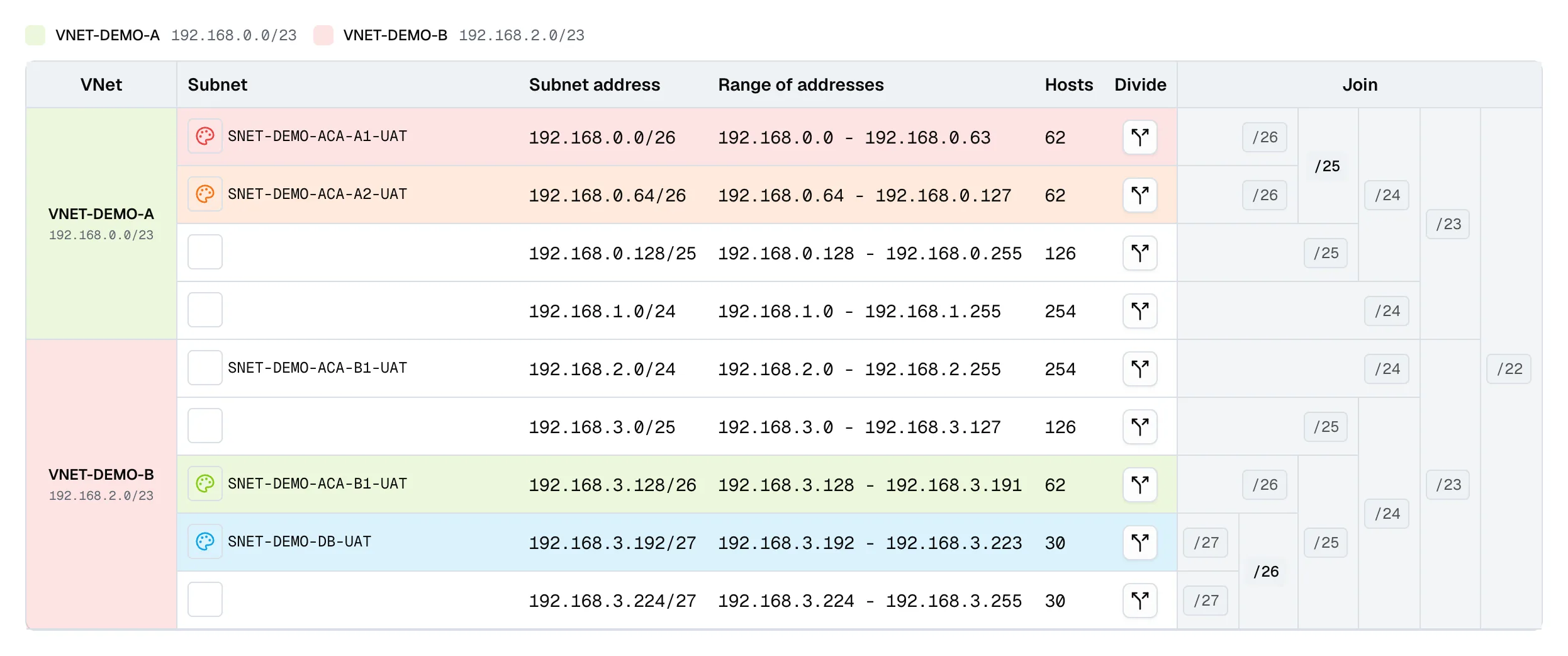
Handy for whiteboarding and screenshots. Push the final numbers to your wiki or IPAM when you’re done.
Questions? Leave a comment below or email: newbvirgil@gmail.com