Contents
Most of us have at least heard of OAuth2.
New to the vocabulary? Skim Authentication vs authorization — OAuth2, OIDC, JWT, and Keycloak for the basics and flows.
With Google as the IdP, the usual story: user hits the consent screen, comes back with an authorization code, you exchange it for tokens, then call Google APIs on the user’s behalf.
Rolling that by hand isn’t huge — but add Facebook, Instagram, and every other IdP and you don’t want N custom integrations. A central auth layer is the point. Here we use Keycloak as that layer.
If you can’t reproduce it locally, it’s hard to learn or debate the design. This walkthrough uses Rust/Axum + Keycloak, with docker-compose, Terraform, and shell scripts so you can replay the whole stack on a Mac. Repo: https://github.com/NewbMiao/axum-koans
OAuth with Google first
Before Keycloak, walk through plain Google OAuth so the brokered flow has something to compare against.
Prerequisite: a Google OAuth client
clientIdandclientSecret. See Create a Google Application in How to setup Sign in with Google using Keycloak.
In the authorization code flow, the client and auth server mainly do two things:
- Build an auth URL; after login, receive a
codeto exchange for tokens - In the callback, swap the
codefor credentials — typicallyaccessToken(and oftenrefreshToken)
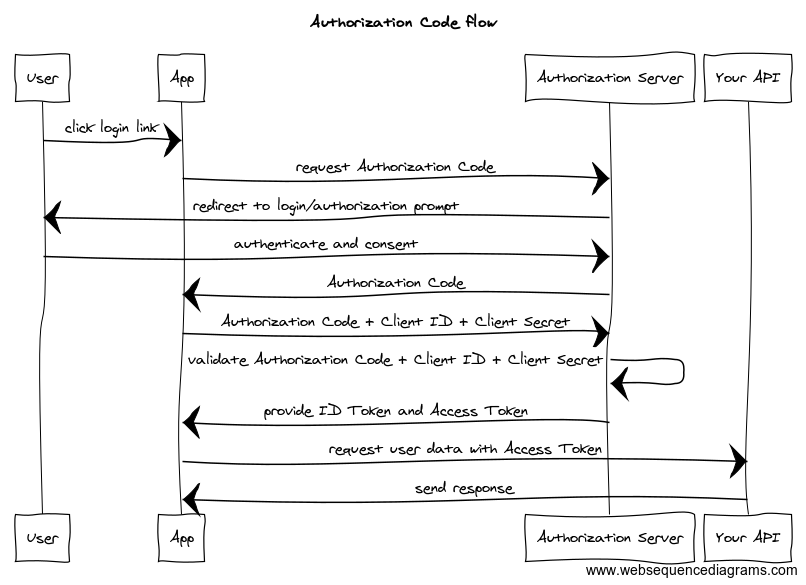
You can wire this yourself; in practice people use an OIDC client (OpenID Connect on top of OAuth2 — standardized user identity for apps).
The shape is similar across languages. Below: the Rust oauth2 crate.
If Rust is new to you, lean on the inline comments in the snippets — they carry most of the narrative.
Initialize the OIDC client
1 | // src/extensions/google_auth.rs@GoogleAuth::new |
Build the auth URL
1 | // src/extensions/google_auth.rs@GoogleAuth::auth_url |
access_type=offline matters when the app needs long-lived access: access tokens expire; without a refresh token you’re back to nagging users to sign in again.
For hardening, state isn’t the only option — PKCE (Proof Key for Code Exchange) is in the repo if you want to trace it.
Auth callback: exchange the code
1 | // src/extensions/google_auth.rs@GoogleAuth::get_tokens |
Once local config matches the docs, hit http://localhost:8000/google/auth and run through the flow.
Keycloak as identity broker
Keycloak configuration
To put Keycloak in front of Google, add a Keycloak identity provider (IdP).
Terraform with the keycloak provider shows the same knobs you’d click in the admin UI — compare with How to setup Sign in with Google using Keycloak.
1 | # Default admin-cli provider; you can use a dedicated client + client_secret instead |
It looks verbose, but the comments mark the three real steps. Next: code against that realm.
Keycloak auth in the app
Once the realm exists, auth and token calls go through its issuer URL — Keycloak’s stand-in for Google’s auth server.
- Initialize the Keycloak OIDC client
1 | // src/extensions/keycloak_auth.rs@KeycloakAuth::new |
- Build the auth URL
Mostly the same as the direct Google client — that’s the payoff of OIDC: one client shape, many issuers, consistent login UX, less bespoke security glue.
By default the browser lands on Keycloak’s login page with Google as an option. To skip straight to Google, use the client hint kc_idp_hint (Client-suggested Identity Provider).
1 | // src/extensions/keycloak_auth.rs@KeycloakAuth::auth_url |
- Auth callback: exchange the code
Same pattern as Google — omitted here.
You end up with Keycloak tokens. What if the app still needs Google tokens?
Two paths.
Option 1: token exchange
Token exchange swaps one token for another — here, Keycloak’s access token for Google’s external token.
Keycloak settings
Token exchange is still preview in Keycloak. Enable
admin-fine-grained-authz,token-exchangeinfeatures(see the Keycloakdocker-composeconfig).
1 | # Ask the Google IdP for refresh tokens (needed for token exchange) |
Code
1 | let token_url = |
You get a Google access token Keycloak obtained via the stored Google refresh token. Hold a Keycloak access token → call Google APIs. Straightforward on paper.
Option 2: broker stored tokens
What about the Google refresh token itself?
Some clients refresh Google access tokens on their own. They shouldn’t need a Keycloak access token first just to fish out Google’s refresh token.
Use Retrieving external IDP tokens: Keycloak persists external tokens at login; grant the user broker read token and you can read stored external access + refresh tokens with a Keycloak access token.
Keycloak settings
1 | resource "keycloak_oidc_google_identity_provider" "google" { |
Note: in Keycloak 21.1.1,
add_read_token_role_on_createdidn’t show in the admin UI but the admin API accepted it — awkward if you’re clicking instead of Terraform-ing.
Code
Fetch stored IdP tokens; point at the broker endpoint for Google:
1 | // src/extensions/keycloak_auth.rs@KeycloakAuth::get_idp_token |
Exposing refresh tokens to end users needs extra guardrails — tighten who can hit the broker read-token API.
After you bring the stack up locally, try http://localhost:8000/keycloak/login.
That’s the Keycloak-shaped way to manage external auth — notes from wiring it in production-minded experiments. Repo again for a full replay: https://github.com/NewbMiao/axum-koans
Questions? Leave a comment below or email: newbvirgil@gmail.com