Tips: all for hands-free.
This series is a log of small tricks that save time day to day.
One goal: don’t let repetitive chores numb you — automate when you can.
Today: using GDB on Go without fighting the setup.
Why GDB?
If you care what the code is really doing, it’s hard to beat — especially when you’re chasing a bug.
For deep dives, see Using a debugger to learn Go (Xargin).
Getting from install to “it works” can be painful (Mac especially). This post is about staying out of that rabbit hole.
(Docker and macOS both covered.)
The Docker path is what I’d try first.
Docker: three steps to a debug session
With Docker you spin up a debugger when you need it and toss it when you’re done.
Demo: gdb-debug-go-in-docker

Steps (portable — same idea on another machine):
1 | // 1. Start GDB image with current directory mounted |
That’s the whole loop. The newbmiao/gdb-go image setup lives in the repo linked below.
Wondering what those Docker flags do? Pointers below — skim if you care.
Discussion: apparmor denies ptrace to docker-default profile
- AppArmor
AppArmor is a Linux kernel security module that caps what a process can do. Each process can have a profile that allows or denies capabilities (network, file access, etc.).
See AppArmor security profiles for Docker.
- Seccomp
Seccomp (secure computing mode) limits which syscalls a process may invoke. Docker ships a default filter; you can replace it with your own allow/deny list.
See Seccomp security profiles for Docker.
- SYS_PTRACE
With seccomp=unconfined, the container can use ptrace — handy for strace, ltrace, and GDB.
macOS: codesign GDB
Versions: gdb 8.3.1 on macOS High Sierra 10.13.6
Steps:
- Create a System keychain certificate named
gdb-cert
The important fields are highlighted in the GIF; otherwise click through the wizard. (The cert must exist before codesign will work.)
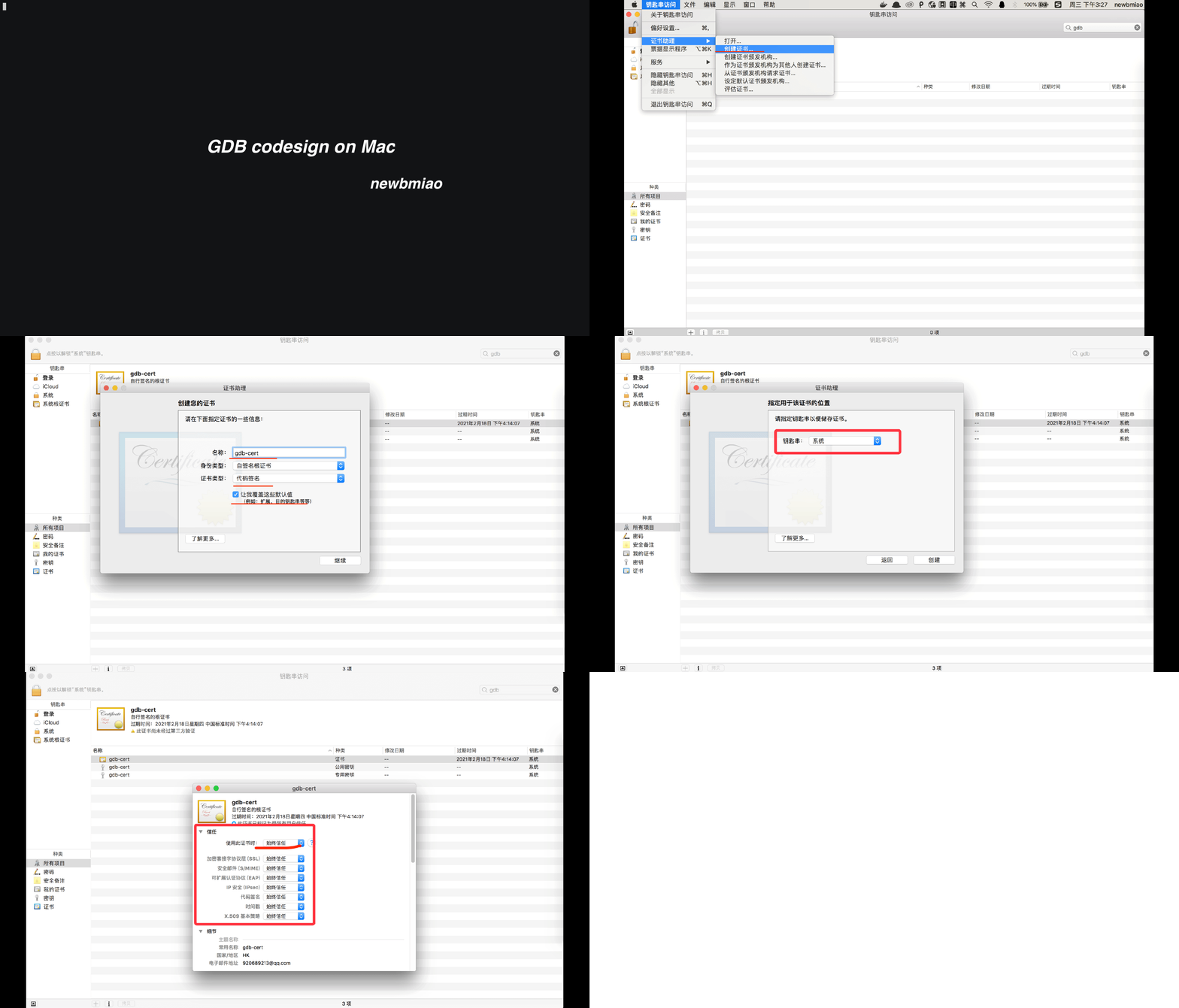
If creation fails: delete the cert and try again (best), or create a Login cert → export → import into System.
- Codesign GDB
Script in the repo:
sh debugger/gdb/installMac.sh
- Debug (same build flags as Docker)
Cert walkthrough: PermissionsDarwin
Common gotchas:
- codesign
1 | Unable to find Mach task port for process-id 3884: (os/kern) failure (0x5). |
- First run hangs
1 | gdb ./test |
Workaround:
In another terminal, find the PID and kill it; later runs behave.
1 | ps aux|grep gdb |
- SIG113
See: GDB kind of doesn’t work on macOS Sierra
Fix:
1 | ~/.gdbinit |
- Help GDB read Go debug info
Build with uncompressed DWARF and no inline/escape optimizations:
go build -ldflags=-compressdwarf=false -gcflags=all="-N -l" -o test test.go
GDB loads Go runtime support via
$GOROOT/src/runtime/runtime-gdb.py.
Confirm in the binary:strings test |grep gdb
libsystem_darwin.dyliberrors
Usually safe to ignore: GDB giving weird errors
Scripts: NewbMiao/free-hands-tips
See more:
Questions? Leave a comment below or email: newbvirgil@gmail.com